 Leon Ding
🏺️
UrnaDB is a NoSQL database support diverse data types and transactions.




🎉 Features
- Support for multiple built-in data structures
- High throughput, low latency, efficient batch data writing
- Support for disk data storage and garbage collection
- Support for static data encryption and compression
- IP whitelist functionality for secure data access
- Data operations via RESTful API protocol
🚀 Quick Start
You can quickly deploy the urnadb:latest image using Docker to test UrnaDB services. Run the following command to pull the UrnaDB image:
docker pull auula/urnadb:latest
Run the UrnaDB container and map the port to the external host network with the following command:
docker run -p 2668:2668 auula/urnadb:latest
UrnaDB provides data interaction through RESTful APIs, theoretically supporting any HTTP protocol-capable client to access and operate UrnaDB service instances. When calling the RESTful API, you need to add Auth-Token in the request header for authentication. This key is automatically generated by the UrnaDB process and can be obtained from the container runtime logs. Use the following command to view the startup logs:
root@2c2m:~# docker logs 66ae91bc73a6
              __  __              ___  ___
             / / / /______  ___ _/ _ \/ _ )
            / /_/ / __/ _ \/ _ `/ // / _  |
            \____/_/ /_//_/\_,_/____/____/  v1.1.2

  UrnaDB is a NoSQL database based on Log-structured file system.
  Software License: Apache 2.0  Website: https://urnadb.github.io

[UrnaDB:C] 2023/06/04 18:35:15 [WARN] The default password is: QGVkh8niwL2TSkj72icaKBC9B
[UrnaDB:C] 2023/06/04 18:35:15 [INFO] Logging output initialized successfully
[UrnaDB:C] 2023/06/04 18:35:15 [INFO] Loading and parsing region data files...
[UrnaDB:C] 2023/06/04 18:35:15 [INFO] Regions compression activated successfully
[UrnaDB:C] 2023/06/04 18:35:15 [INFO] File system setup completed successfully
[UrnaDB:C] 2023/06/04 18:35:15 [INFO] HTTP server started at http://192.168.31.221:2668 🚀
If you plan to run UrnaDB as a long-term service, it's recommended to run it directly on mainstream Linux distributions rather than using container technology. Running UrnaDB on bare metal Linux allows manual optimization of storage engine parameters for more stable performance and higher resource utilization. For specific parameter configurations, please refer to the official documentation.
🕹️ RESTful API
Currently, UrnaDB provides data interaction interfaces based on HTTP protocol's RESTful API. Any client software supporting the HTTP protocol can perform data operations. We recommend using curl for data interaction operations. UrnaDB internally provides various data structure abstractions, such as Table, List, ZSet, Set, Number, and Text types, corresponding to commonly used data structures in business code. Here's an example of RESTful API data interaction using the Table type structure.
The Table structure is similar to JSON and any semi-structured data with mapping relationships. For example, struct and class fields in programming languages can be stored using Table. Below is a Table structure JSON abstraction, where the ttl field sets the survival time, and the data will be automatically deleted after 120 seconds:
{
    "table": {
        "is_valid": false,
        "items": [
            {
                "id": 1,
                "name": "Item 1"
            },
            {
                "id": 2,
                "name": "Item 2"
            }
        ],
        "meta": {
            "version": "2.0",
            "author": "Leon Ding"
        }
    },
    "ttl": 120
}
Here's an example of data storage using curl. Due to the RESTful API design style, you need to add data type information in the HTTP request path URL. Note that storage uses the HTTP PUT method, which will directly create a new data version overwriting the old one:
curl -X PUT http://localhost:2668/table/key-01 -v \
     -H "Content-Type: application/json" \
     -H "Auth-Token: QGVkh8niwL2TSkj72icaKBC9B" \
     --data @tests/table.json
To retrieve data, simply change the HTTP request to GET method to obtain the corresponding storage record:
curl -X GET http://localhost:2668/table/key-01 -v \
-H "Auth-Token: QGVkh8niwL2TSkj72icaKBC9B"
To delete the corresponding data record, simply change the HTTP request to DELETE method:
curl -X DELETE http://localhost:2668/table/key-01 -v \
-H "Auth-Token: QGVkh8niwL2TSkj72icaKBC9B"
More complex query and update operations will be supported in future version updates. For code examples of other data structure type operations, please check the official documentation.
🧪 Benchmark Test
Since the underlying storage engine writes all operations to data files in an Append-Only Log manner, the test case report provided here focuses on the write performance test results of the core file system vfs package. The hardware configuration for running the test code is (Intel i5-7360U, 8GB LPDDR3 RAM), and the write benchmark results are as follows:
$: go test -benchmem -run=^$ -bench ^BenchmarkVFSWrite$ github.com/auula/urnadb/vfs
goos: darwin
goarch: amd64
pkg: github.com/auula/urnadb/vfs
cpu: Intel(R) Core(TM) i5-7360U CPU @ 2.30GHz
BenchmarkVFSWrite-4   	  173533	      7283 ns/op	     774 B/op	      20 allocs/op
PASS
ok  	github.com/auula/urnadb/vfs	2.806s
There is a tools.sh utility script file in the project root directory that can quickly help complete various auxiliary tasks.
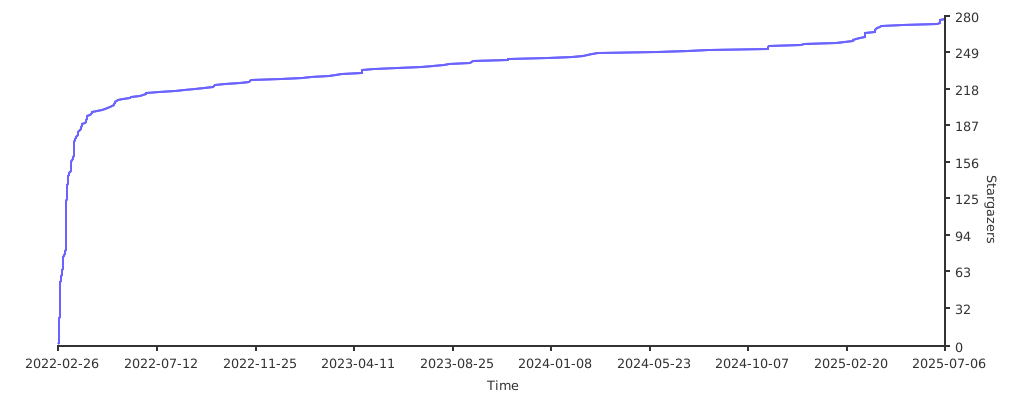
🌟 Stargazers over time
👬 Contributors
🤝 Thanks to all the contributors below!